Blog/Tutorial
Ad Checker Icon

Automatic Ad Compliance Checker

Build an automated system that scans websites for ads, captures screenshots, and validates compliance against your brand guidelines using AI. Perfect for marketing teams managing campaigns at scale.
25 min readAdvancedDecember 26, 2025
Automatic Ad Checker Workflow
10+
Ads Checked Per URL
~2min
Per Page Scan

Two-Layer Architecture

Flow Playground

The browser automation and compliance engine. Crawls pages, captures ad screenshots, extracts text, and validates against custom rules using AI.

We'll build this first

App Playground

The control interface. Input target URL, search terms, and compliance rules. View flagged ads in an image gallery with violation details.

We'll build this second

What This Automation Does

Browser Automation
  • • Opens pages with proxy support
  • • Scrolls to load dynamic content
  • • Searches for specific ad elements
  • • Captures individual ad screenshots
AI Compliance Checking
  • • Extracts text from ad elements
  • • Validates against custom rules
  • • Provides yes/no compliance verdict
  • • Explains violations clearly
Flexible Configuration
  • • Custom search terms for ad targeting
  • • Brand-specific compliance instructions
  • • Configurable scroll and wait times
  • • Multi-page crawling support
Visual Documentation
  • • Full page screenshots
  • • Individual ad element captures
  • • Cloud storage for all images
  • • Gallery view with metadata

Part 1: The Ad Scanning & Compliance Flow

This advanced flow uses browser automation to scan websites for ads, capture screenshots, extract text, and validate compliance using GPT-4.1. Let's break down the key stages.

Stage 1: Setup & Website Crawl

API Input
Crawler
Browser Open
API Input: Receives target URL, search terms, and compliance instructions
Crawler: Discovers pages on the target website (depth 1, max 1 page for speed)
Browser Open: Opens browser with proxy support (country: IL) for each discovered page

Stage 2: Page Loading & Dynamic Content

Navigate
Delay (14s)
Scroll (2x)
Delay (4s)
Navigate: Goes to target URL in the browser
First Delay (14s): Waits for initial page load and JavaScript execution
Scroll (2x): Scrolls page twice with 500ms between scrolls to trigger lazy-loaded ads
Second Delay (4s): Waits for dynamic content to fully load after scrolling
Why the delays: Modern ad platforms use JavaScript and lazy loading. These delays ensure all ads are visible before we search for them.

Stage 3: Ad Discovery & Element Search

Browser Search Text
Array Flatten
Iterator
Browser Search Text: Searches page for user-provided search terms (e.g., "sponsored", "ad", brand names)
Configuration:
  • • Max 10 results per search
  • • Searches up to 3 parent levels (captures entire ad container)
  • • Returns element index for each match
Array Flatten + Iterator: Processes each found ad element individually

Stage 4: Screenshot & Text Extraction

For Each Ad Element:
1.Browser Screenshot: Captures visual of the specific ad element
2.Browser Get Text: Extracts all text content from the element
3.S3 Upload: Uploads screenshot to cloud storage, gets permanent URL
Parallel Data Collection:
Per Ad Element:
• screenshot_url: "s3://..."
• text: "Extracted ad copy"
• element_index: 0-9

Stage 5: AI Compliance Validation

AI Prompt
Model: GPT-4.1
Input: Instructions + Text
Output: Compliance verdict
Input:
  • • User's compliance instructions
  • • Extracted ad text
Output:
  • meet_compliance: "yes" or "no"
  • explain_why: Detailed explanation
Example Prompt:
Following the instructions: "{instructions}" Check this ad text: "{text}" Return: meet_compliance (yes/no) and explain_why
Example instructions: "Flag any ads claiming '100% guaranteed results', mentioning specific financial returns, or using urgency tactics like 'limited time only'."

Stage 6: Merge & Store Results

Merge Arrays
Dataset (Write)
Merge Arrays: Combines 3 data streams into single records:
  • • Array 1: Screenshot URLs (from S3 Upload)
  • • Array 2: Ad text (from Browser Get Text)
  • • Array 3: Compliance results (from AI Prompt)
Dataset Sink: Saves complete ad records to cloud storage
Final Dataset Schema:
{ "screenshot_url": "https://s3.../ad-image.png", "text": "Extracted ad copy and text", "meet_compliance": "no", "compliance_info": "Violates rule X because..." }
Flow Summary

Input (URL + Rules) → Crawler → Browser Open → Navigate & Wait → Scroll & Load → Search Ads → Iterate → Screenshot + Text + Upload → AI Compliance Check → Merge Data → Store Results

Time: ~2min
Per page scan
Output: 10+ ads
With compliance verdicts

Part 2: The App Playground (Control Interface)

The app provides a simple interface to configure and monitor ad compliance checks.

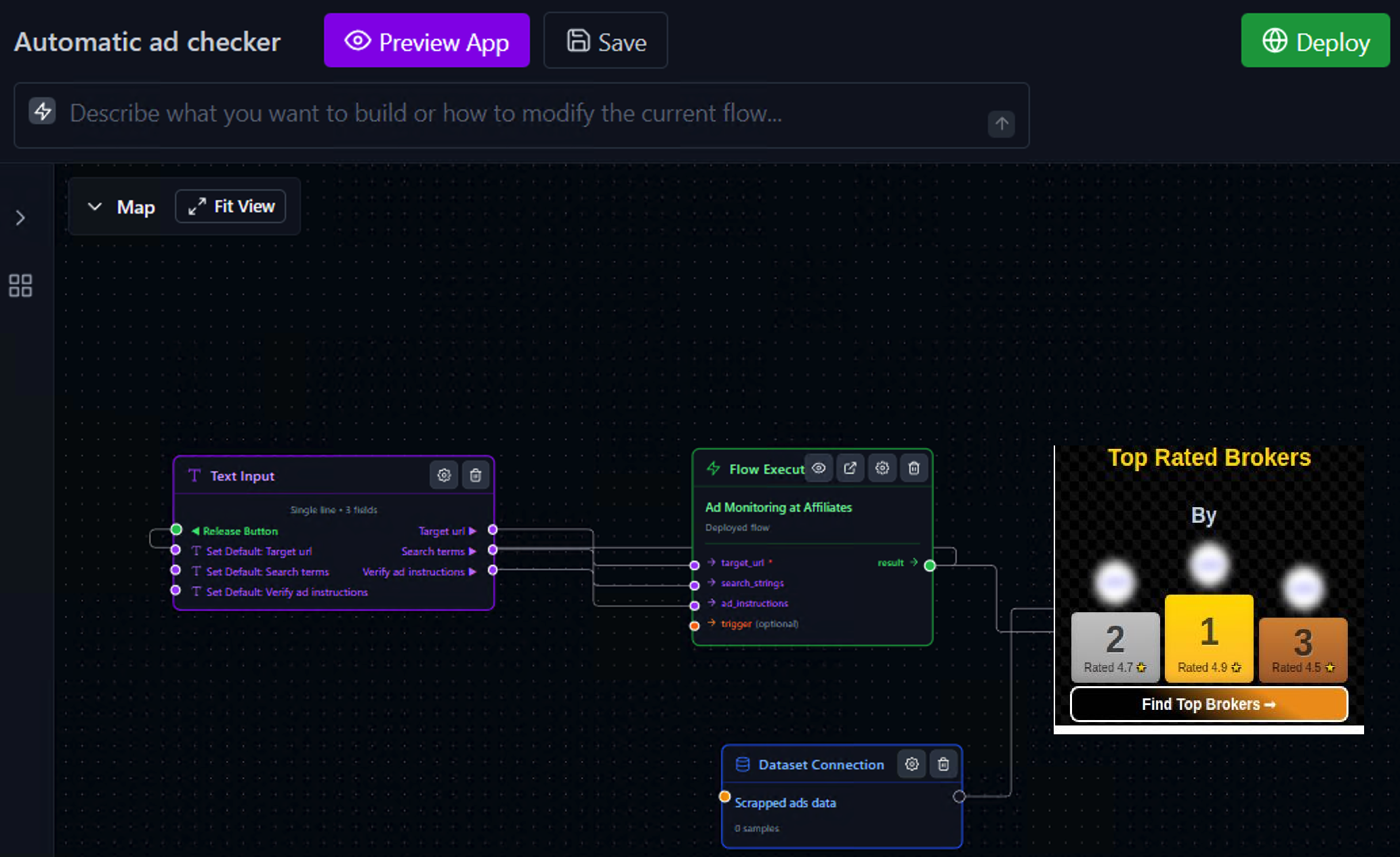
Complete App Structure

Input Layer
Text Input (3 Fields)
• Target URL
• Search Terms
• Compliance Instructions
Flow Execution Layer
Flow Execution
Ad Monitoring Flow
Calls Part 1 flow
Display Layer
Dataset Connection
Scrapped Ads Data
Image Gallery
Flagged Ads

How It Works Together:

1. Configure: Enter target URL (e.g., affiliate partner's site), search terms (e.g., "ad", "sponsored", your brand name), and compliance rules
2. Execute: Click "Check ads compliance" to trigger the scan
3. Processing: Flow opens pages, scrolls, searches for ads, captures screenshots, extracts text, and validates compliance
4. Storage: All findings are saved with screenshots and compliance verdicts
5. Review: Image gallery displays flagged ads with:
  • • Ad screenshot
  • • Snapshot timestamp
  • • Compliance status (yes/no)
  • • Detailed violation explanation
6. Action: Review violations and take action (contact affiliate, adjust guidelines, etc.)
Example Use Case:
Monitor affiliate partners to ensure they're not making exaggerated claims about your product. Set search terms to your brand name, provide compliance rules like "No income guarantees, no before/after photos without disclaimers", and run daily scans to catch violations early.

Deployment & Use Cases

Schedule Daily Scans

Run automated checks on key pages daily

Monitor affiliate sites, competitor ad placements, or your own ad network for compliance issues

REST API Integration

Call from your compliance dashboard

Integrate with your marketing tools to trigger checks before campaign launches

Industry Applications

Finance & Healthcare:
  • • Verify disclaimers are present
  • • Check for prohibited claims
  • • Monitor regulatory compliance
  • • Document violations for audits
Affiliate Marketing:
  • • Monitor partner ad quality
  • • Enforce brand guidelines
  • • Catch misleading claims early
  • • Protect brand reputation

Ready to Automate Ad Compliance?

Start building with Evaligo's visual workflow builder. No coding required.

No credit cardFree tierDeploy in 1-click

Related