
Build an AI Twitter Post Generator in 5 Minutes
Build an AI Twitter Post Generator in 5 Minutes
Social media management can be time-consuming. In this tutorial, you'll learn how to build an AI-powered Twitter post generator that creates engaging posts from any website URL in minutes.
What You'll Build
By the end of this tutorial, you'll have a working AI workflow that:
- ✅ Takes a website URL as input
- ✅ Scrapes the content
- ✅ Analyzes key features
- ✅ Generates engaging Twitter posts
- ✅ Returns ready-to-publish content
**Time to complete:** 5 minutes
**Difficulty:** Beginner
**Prerequisites:** None (we'll guide you through everything)
The Workflow
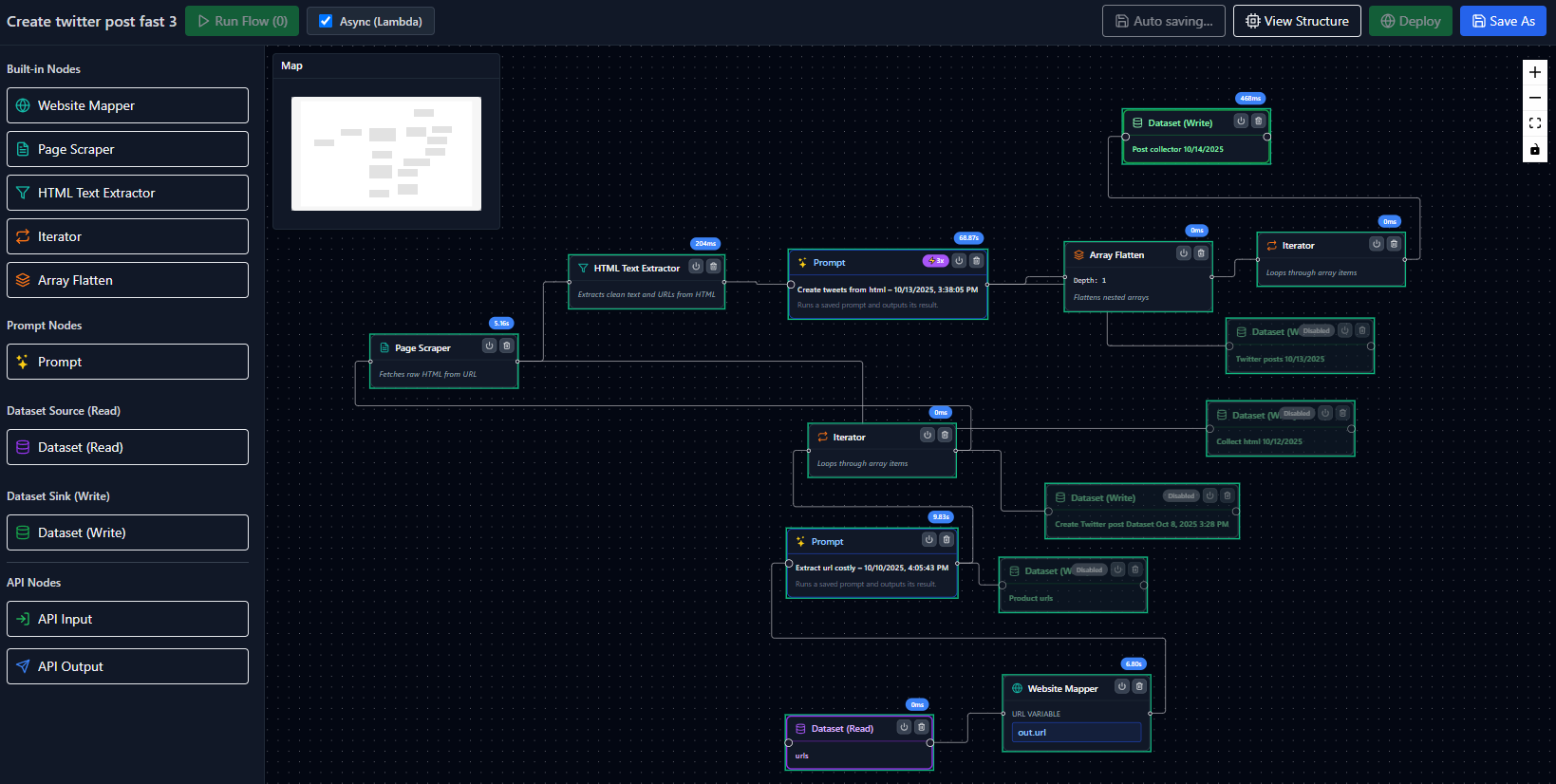
Here's what our workflow looks like:

Workflow Components
1. **API Input Node** - Accepts the website URL
2. **Page Scraper Node** - Fetches the webpage content
3. **HTML Text Extractor Node** - Extracts clean text
4. **Prompt Node** - AI generates Twitter posts
5. **API Output Node** - Returns the generated posts
Step-by-Step Guide
Step 1: Create API Input
First, add an **API Input** node to accept the website URL:
```json
{
"inputFields": [
{
"name": "website_url",
"type": "string",
"required": true,
"description": "The website URL to analyze"
}
]
}
```
This node will be the entry point to your workflow.
Step 2: Add Page Scraper
Connect a **Page Scraper** node to fetch the website content:
- **URL:** `{{website_url}}` (from input)
- **Wait for:** Page load
- **Timeout:** 30 seconds
The scraper will retrieve the HTML content of the page.
Step 3: Extract Text Content
Add an **HTML Text Extractor** node to clean up the HTML:
- **Remove scripts:** Yes
- **Remove styles:** Yes
- **Max length:** 5000 characters
This gives us clean text to analyze.
Step 4: Generate Twitter Posts with AI
Now the magic happens! Add a **Prompt Node** with this prompt:
```
You are a social media expert. Create 3 engaging Twitter posts about the following content.
Content: {{extracted_text}}
Requirements:
- Each post must be under 280 characters
- Use emojis strategically
- Include relevant hashtags
- Make it engaging and actionable
- Focus on key features or benefits
Return as JSON array with this format:
[
{ "post": "...", "hashtags": ["..."] },
{ "post": "...", "hashtags": ["..."] },
{ "post": "...", "hashtags": ["..."] }
]
```
**Model:** GPT-4 (for best quality)
**Temperature:** 0.7 (creative but focused)
**Output schema:** Enable structured output
Step 5: Return the Results
Finally, add an **API Output** node to return the generated posts:
```json
{
"posts": "{{prompt_output}}",
"source_url": "{{website_url}}"
}
```
Test Your Workflow
1. Click "Run Flow"
2. Enter a website URL (try: https://www.evaligo.com)
3. Watch the workflow execute
4. Get 3 ready-to-publish Twitter posts!
Example Output
For `https://www.evaligo.com`, you might get:
```json
{
"posts": [
{
"post": "🚀 Build AI workflows visually without code! Drag, drop, and deploy production APIs in minutes. Perfect for developers who want to ship faster. #NoCode #AIAutomation",
"hashtags": ["NoCode", "AIAutomation"]
},
{
"post": "✨ Test AI prompts with real datasets, compare models, and deploy confidently. The complete platform for serious AI developers. #PromptEngineering #AI",
"hashtags": ["PromptEngineering", "AI"]
},
{
"post": "💡 From prototype to production in one platform. Build workflows, test prompts, deploy APIs - all with beautiful visual tools. Free plan available! #Developer #AI",
"hashtags": ["Developer", "AI"]
}
],
"source_url": "https://www.evaligo.com"
}
```
Deploy as API
Want to use this in your app? Deploy it as a REST API:
1. Click "Deploy" in the top right
2. Get your API endpoint
3. Call it from any application:
```bash
curl -X POST https://api.evaligo.com/flows/your-flow-id/run \
-H "Authorization: Bearer YOUR_API_KEY" \
-H "Content-Type: application/json" \
-d '{"website_url": "https://example.com"}'
```
Next Steps
🎯 **Try These Variations:**
- Add sentiment analysis
- Generate posts for multiple platforms (LinkedIn, Facebook)
- Include image generation
- Schedule automatic posting
- Add brand voice customization
🔧 **Optimization Tips:**
- Use GPT-3.5-turbo for faster/cheaper results
- Add caching for frequently scraped sites
- Implement error handling
- Add content length validation
Get the Template
Want to skip the setup? Use our pre-built template:
[**Get Twitter Post Generator Template**](/use-cases/marketing-automation/social-media/website-to-twitter-posts)
Conclusion
You've just built an AI-powered Twitter post generator in 5 minutes! This workflow can save hours of manual content creation and help maintain a consistent social media presence.
**What to do next:**
- Try it with different websites
- Customize the prompt for your brand voice
- Deploy it as an API for your team
- Build on this foundation
Have questions? [Join our Discord](https://discord.gg/evaligo) or check out [more tutorials](/blog).
Happy automating! 🚀
Ready to Build Your Own Workflows?
Start building powerful AI workflows for free. No credit card required.